
How to Book a Meeting Room Online in KL: Step by Step
To book a meeting room online in KL, choose your date and duration, select a room that fits your guests, then review the total and booking terms before paying. At Maxsmart Event Space, room bookings are confirmed when full payment succeeds, with arrival details sent by email.
1. Choose your date and reserve enough time
Start with the availability of the people who must attend. Agree on the meeting date before comparing rooms, and keep an alternative in mind if your preferred slot is unavailable. For colleagues joining from overseas, state the meeting time in Malaysia time when checking availability.
Your reservation should cover the whole time you need the room. Include connecting the presenting laptop and testing the call before guests settle in, as well as packing away afterwards. Maxsmart’s booking terms include setup and pack-down within the reserved slot.
Our online booking hours are 8:30am to 5:30pm, every day, and the site asks you to book at least two days ahead. Available booking lengths are two hours, three hours, a half day of four hours or a full day of eight hours. Choose a start time that allows the entire session to finish within the available hours.
For help deciding between those options, our hourly, half-day and full-day rental guide explores how to match a booking length to your agenda.
2. Match the room to your guests and meeting format
Count everyone who will be physically present, including visiting presenters. Remote participants belong in your technical plan, while the room’s seating capacity needs to accommodate the people attending in person. Check the capacity for your intended layout before selecting a room.
A discussion around a shared table has different needs from a presentation with an audience facing forward. If participants need laptops or printed materials in front of them, check the classroom arrangement rather than relying on the room’s largest advertised capacity. Photographs can help you assess how guests will see the screen and work together.
For a hybrid meeting, establish which platform you’ll use and how the presenter will share material. Confirm the camera and room audio arrangements before paying. Our meeting room inclusions guide explains what to check beyond the phrase “fully equipped”.
Keep catering requirements separate from the seating decision. If meals or a particular arrangement are essential, establish availability and cost before treating the room reservation as your complete meeting plan.
3. Compare Maxsmart Event Space rooms and rates
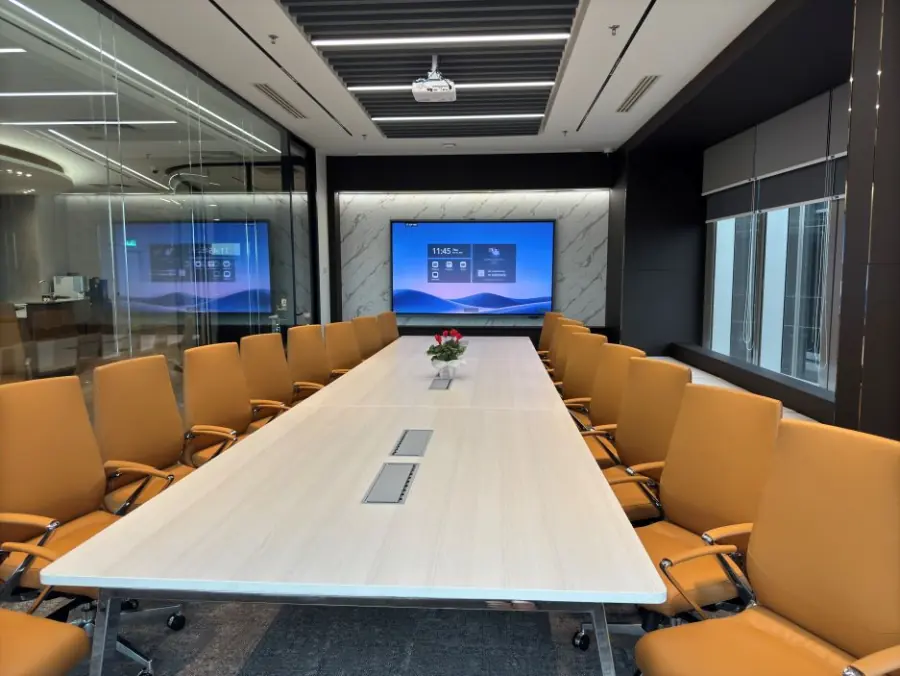
We’re at Level 13, Corporate Tower 2, Pavilion Damansara Heights, Kuala Lumpur. Nexus Executive Boardroom accommodates up to 18 guests around one table. Synergy Suite offers flexible layouts, with capacity for up to 72 in theatre seating or 36 in classroom seating.
The standard room rates below include SST. Hourly bookings have a two-hour minimum, and a flat RM300 fee applies to weekend and public holiday bookings, in addition to the room charge.
| Room | Standard hourly rate | Half day, 4 hours | Full day, 8 hours |
|---|---|---|---|
| Nexus Executive Boardroom | RM300 | RM1,200 | RM1,800 |
| Synergy Suite | RM600 | RM2,300 | RM3,600 |
Both rooms include MAXHUB screens, 1Gbps Wi-Fi and an on-site tech assistant. USB-C and wireless screen sharing, a smart whiteboard and filtered water are included. Synergy Suite also has an LED wall, smart lectern and professional PA system.
Choose Nexus when your group needs a shared table for a focused discussion. Consider Synergy Suite when your meeting calls for a larger audience or a different seating arrangement. The live room details are the current reference for rates and inclusions.
4. Enter your booking and check the final total
On the booking card, select your room and date, then choose the length and an available start time. Enter the number of guests and check that it fits your selected room and layout. Review the date carefully before moving to payment, particularly if you have been comparing alternative days.
If your company qualifies, enter FIRST50 in the promo-code field and select Apply. The live offer gives new customers 50% off their first room booking, limited to one booking per company. Both the booking and the meeting must take place by 31/12/2026.
FIRST50 reduces the room rate only. Weekend and public holiday fees remain payable at their usual rate, and the offer cannot be combined with other offers. Check that the price summary reflects the discount before continuing.
Treat the final payable total as your approval figure. Catering is available on request, while guests pay separately for Pavilion Damansara Heights parking. Keep those arrangements in your meeting budget so the room payment does not become the only cost your colleagues expect.
5. Read the terms, then complete payment
Before paying, check what happens if your meeting changes. Under our booking terms, standard Nexus bookings qualify for a full refund with at least seven working days’ notice; Synergy Suite requires at least 14 working days. Shorter notice has different refund conditions.
Promotional bookings have no cash refund. Cancellation within the applicable full-refund period gives credit for a booking within three months. A date change also has conditions, so read the policy before choosing a promotional rate if your schedule is uncertain.
After selecting Reserve, the checkout asks for your full name, company, work email and mobile number. Use an email address you can access and check it for typing errors. Review the room and booking details again before selecting Continue to payment.
Payment takes place on Stripe’s secure checkout, where you can choose FPX online banking or card. Room bookings require full payment to confirm. Selecting a date or reaching checkout does not complete the reservation; successful payment does. See the live booking process.
6. Keep your confirmation and prepare for arrival
Once payment succeeds, keep the booking confirmation and arrival email where the organiser can find them. Check that the confirmed room, date and duration match your plan. If an email does not arrive, checking your spam folder is a sensible first step before following up with your booking details.
Share the building and floor with your guests, rather than sending only the mall name. The venue is in Corporate Tower 2 on Level 13. For guests travelling by rail, Pusat Bandar Damansara MRT connects to the mall by a covered walkway.
Have your presenting files and meeting link ready before the day. Use the preparation time within your reservation to check screen sharing and, where needed, the remote participants’ audio. Keep the session within its booked finish time, as extra time depends on room availability.
Frequently asked questions
How far in advance should I book a meeting room?
Maxsmart Event Space asks you to book at least two days ahead. Check the online calendar for availability before finalising invitations.
Can I book a meeting room for one hour?
Maxsmart Event Space has a two-hour minimum booking. The online options are two hours, three hours, a four-hour half day or an eight-hour full day.
How do I pay for a meeting room booking?
You can pay by FPX online banking or card through Stripe’s secure checkout. Full payment confirms your Maxsmart room booking, and arrival information is sent by email.
Can I book a meeting room on a weekend?
Yes, Maxsmart Event Space accepts online weekend and public holiday bookings between 8:30am and 5:30pm, subject to availability. A flat RM300 fee applies in addition to the room rate.
Can I cancel a meeting room booked with FIRST50?
FIRST50 bookings have no cash refund. Cancel within the applicable full-refund period to receive credit for a booking within three months: at least seven working days before Nexus or 14 working days before Synergy Suite.
To check availability and book your meeting room, visit Maxsmart Event Space and select the date and duration that suit your agenda.