
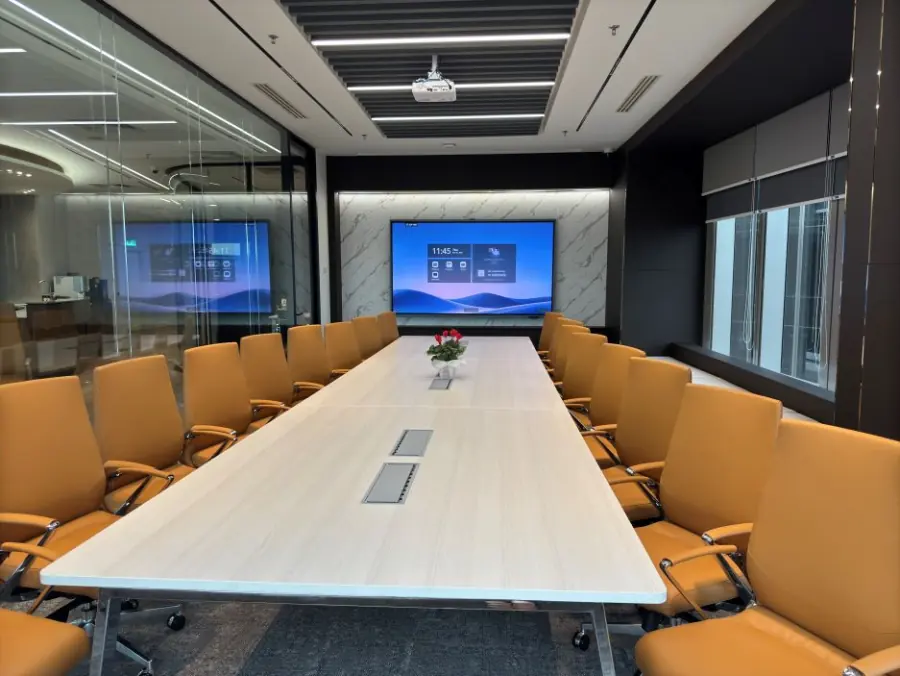
Conference Room Rental KL: Choosing the Right Room
For conference room rental in KL, choose a room around how your meeting will work, then compare the full booking cost and included equipment. For a client presentation or team discussion, look for seating around the same table, a screen everyone can read and practical support for any remote participants. At Maxsmart Event Space, Nexus Executive Boardroom accommodates up to 18 guests in a boardroom setting.
Start with the meeting you need to run
A client meeting needs space for conversation as well as presentation. Before looking at room photographs, decide whether guests will spend most of their time reviewing a proposal on screen or discussing documents around the table. That distinction helps you judge the layout more accurately.
For a team meeting, think about how people will contribute. A planning session may need a shared whiteboard, while a review meeting may involve colleagues taking turns to present from their laptops. Put those requirements into your enquiry so the venue can confirm the relevant equipment.
Ask for the capacity in your intended seating arrangement. A room's largest advertised guest count may describe theatre seating, where participants face the front without a shared table. For a discussion involving laptops and working papers, confirm the actual table arrangement before approving the booking.
Check the view from every seat
Use room photographs to follow the meeting from a guest's perspective. Check where the main display sits and whether people along the sides of the table will need to turn to read it. If your presentation includes detailed financial tables, ask about readability from the furthest seat.
Privacy deserves a separate question. Confirm that the room is reserved for your group and ask about visibility through glass walls if you will discuss sensitive information. Keep confidential material off the display while guests are arriving or moving through the room.
For client meetings, consider the arrival experience too. Ask where guests wait if they reach the venue before you and how reception will direct them. Include the building name and floor in the calendar invitation so your client has clear directions beyond the map pin.
Confirm what the technology includes
A screen and Wi-Fi are useful starting points, but a hybrid meeting needs more preparation. Ask which camera and microphone system you will use, how the room connects to your chosen meeting platform and whether remote guests can hear participants around the table. Confirm who can help if the connection needs attention.
Check the presentation connection using the laptop you intend to bring. Your organisation may restrict wireless sharing or require permission for certain software, so establish the available cable connection as well. Keep an accessible copy of the presentation in case your usual cloud account needs additional sign-in steps.
Plan a short equipment check within your reserved time unless earlier access has been confirmed. Open the actual presentation and join the meeting link before guests arrive, then check sound from a remote participant's side. Our hybrid meeting room readiness guide explores the equipment questions behind this preparation.
Compare the full cost for your agenda
Compare quotations for the same duration and requirements. Ask whether the price includes tax and equipment, then confirm any separate catering or support charges. A headline hourly rate gives you only part of the information needed to approve the meeting budget.
Allow for preparation and closing time when choosing the booking length. Your agenda should leave room to connect the laptop before the discussion and gather your materials afterwards. Confirm how extensions work, particularly if another group may be using the room after you.
Read the cancellation terms before paying, especially when a client's attendance is still tentative. Promotional bookings may have different conditions from standard bookings, including credit instead of a cash refund. Keep the booking confirmation with the approved quotation so whoever manages the meeting can find the terms easily.
How Nexus at Maxsmart Event Space fits
Nexus Executive Boardroom suits client presentations, board meetings and team discussions with up to 18 guests around a shared table. Its equipment includes a 98-inch MAXHUB interactive display, a speaker-following 4K camera and immersive 360° audio. Wireless sharing supports up to eight devices, allowing colleagues to contribute from their own laptops.
Every booking includes 1Gbps Wi-Fi and an on-site tech assistant. USB-C and wireless screen sharing, a smart whiteboard and filtered water are included, with support for Teams, Zoom, Google Meet and Webex. These are the inclusions currently listed on the booking page.
The standard rates below include SST. Both rooms have a two-hour minimum booking, and the full-day option covers eight hours.
| Room | Seating capacity | Standard hourly rate | Half day, 4 hours | Full day, 8 hours |
|---|---|---|---|---|
| Nexus Executive Boardroom | Up to 18 in boardroom style | RM300 | RM1,200 | RM1,800 |
| Synergy Suite | Up to 72 in theatre style; 36 in classroom style | RM600 | RM2,300 | RM3,600 |
For a meeting that needs everyone around the same table, Nexus is the relevant starting point. Synergy Suite provides a flexible alternative when the agenda needs classroom seating or a larger presentation audience. Its maximum theatre capacity should not be treated as a boardroom capacity.
The advertised FIRST50 offer gives eligible companies 50% off their first room booking. Book by 30/11/2026 and hold the meeting by 31/12/2026; the offer applies to the room rate, while weekend and public holiday fees remain payable at the usual rate. Catering is available on request, so confirm the arrangements separately if your agenda includes a meal.
Make the arrival and booking details clear
Maxsmart Event Space is at Level 13, Corporate Tower 2, Pavilion Damansara Heights, Kuala Lumpur. The venue lists a covered walk from Pusat Bandar Damansara MRT, while guests arriving by car pay for mall parking separately. Include Corporate Tower 2 in your directions so guests know which lift access they need. Location and arrival details.
Online room bookings are available daily from 8:30am to 5:30pm, with a fee for weekends and public holidays. The site asks for bookings at least two days ahead, and full payment by FPX or card confirms the reservation. Our meeting room inclusions and booking guide provides further context for planning the reservation.
Frequently asked questions
How much does conference room rental in KL cost at Maxsmart?
Nexus Executive Boardroom costs RM300 an hour, RM1,200 for four hours or RM1,800 for eight hours, including SST. The minimum booking is two hours, and weekend or public holiday fees apply separately.
How many people can Nexus Executive Boardroom accommodate?
Nexus accommodates up to 18 guests in boardroom seating. For a larger group, Synergy Suite accommodates up to 72 in theatre style or 36 in classroom style.
What equipment should I check before renting a conference room?
Confirm the display, laptop connection and internet access, together with camera and microphone arrangements if anyone will join remotely. Ask whether technical assistance is included and allow time to test your actual presentation.
Can I book a conference room for only two hours?
Yes, Maxsmart offers two-hour and three-hour room bookings as well as half-day and full-day options. Include preparation and closing time within your chosen booking period.
Does FIRST50 apply to weekend conference room bookings?
Yes, eligible first bookings can use FIRST50 for meetings held by 31/12/2026, provided the booking is made by 30/11/2026. The discount covers the room rate only, and the weekend or public holiday fee remains payable at the usual rate.
Once your guest count and meeting duration are settled, check availability and book at Maxsmart Event Space. Have your preferred date and start time ready so you can choose the appropriate room and booking length.
