
Hybrid Meeting Room KL: What Makes a Room Ready?
A hybrid meeting room in KL should let remote participants hear the discussion, see the speakers and follow the same content as guests in the room. At Maxsmart Event Space, we provide video conferencing equipment, interactive displays and an on-site tech assistant; the right room depends on whether you're planning a discussion or a larger presentation.
What makes a meeting room hybrid ready?
Start with the experience of someone joining from elsewhere. Can they hear a question from across the table, read the presentation and contribute without waiting for someone to notice them?
A useful room assessment follows the meeting itself. Consider where people will sit, who will present and how remote guests will take part. A board discussion needs a different arrangement from a workshop where the presenter moves around.
Ask what the advertised video call setup actually includes. Establish which camera and microphones serve your layout, how shared content reaches the online meeting, and who helps with the connection. Treat a screen and Wi-Fi as parts of the setup, then check the complete experience.
Microsoft's meeting room planning guidance considers room layout alongside audio, cameras and displays. That is a helpful approach when comparing rooms: assess the equipment in the arrangement you'll use, rather than judging the specification alone.
Check sound and camera coverage from every seat
Give remote guests a clear voice in the room
During your rehearsal, ask someone outside the venue to listen while people speak from different seats. Include an audience question if your agenda has a discussion segment. This gives you a practical check of the setup before guests arrive.
Test the return audio as well. Invite the remote participant to speak and check that the people in the room can hear comfortably, including those furthest from the speakers.
Keep the room's audio connection under control. Microsoft recommends disconnecting computer audio on additional devices joining from the same room to prevent echo or feedback. Its hybrid event production guidance also recommends testing room and online audio separately.
Match the camera view to the conversation
Ask your remote tester what they can see when someone speaks from the side of the table or stands to present. If your agenda includes a panel discussion, rehearse the change between speakers in the actual seating arrangement.
For a workshop, decide whether the camera should show the presenter or the wider room during each activity. Make camera coverage part of your layout discussion, especially when guests will move between tables.
Make shared content and connectivity part of the check
A presentation appearing on the room display is only part of your test. Open the actual online meeting and ask a remote guest to confirm that the shared slides are readable on their device.
If you plan to annotate slides or use a digital whiteboard, rehearse that exact action. Check how the annotations reach online participants and how you intend to save the work afterwards. Avoid assuming that every room display function automatically appears in the meeting feed.
Use the same approach for video clips. Play the material through your intended sharing method and have the remote tester confirm both picture and sound.
For connectivity, ask about the connection available to your meeting equipment and whether your production needs can be accommodated. Run your rehearsal with the camera and shared content active together. If your organisation restricts guest access or screen sharing, involve your IT colleague before the session.
Our Meeting Room Rental KL: Inclusions and How to Book guide helps with the wider room booking checklist. Use it alongside your hybrid checks when assessing the complete booking.
How Maxsmart Event Space fits your hybrid meeting
We are at Level 13, Corporate Tower 2, Pavilion Damansara Heights, Kuala Lumpur. Nexus Executive Boardroom suits meetings around a table, while Synergy Suite offers flexible layouts for a larger audience.
| Room | Published capacity | Equipment relevant to hybrid sessions | Standard room rates |
|---|---|---|---|
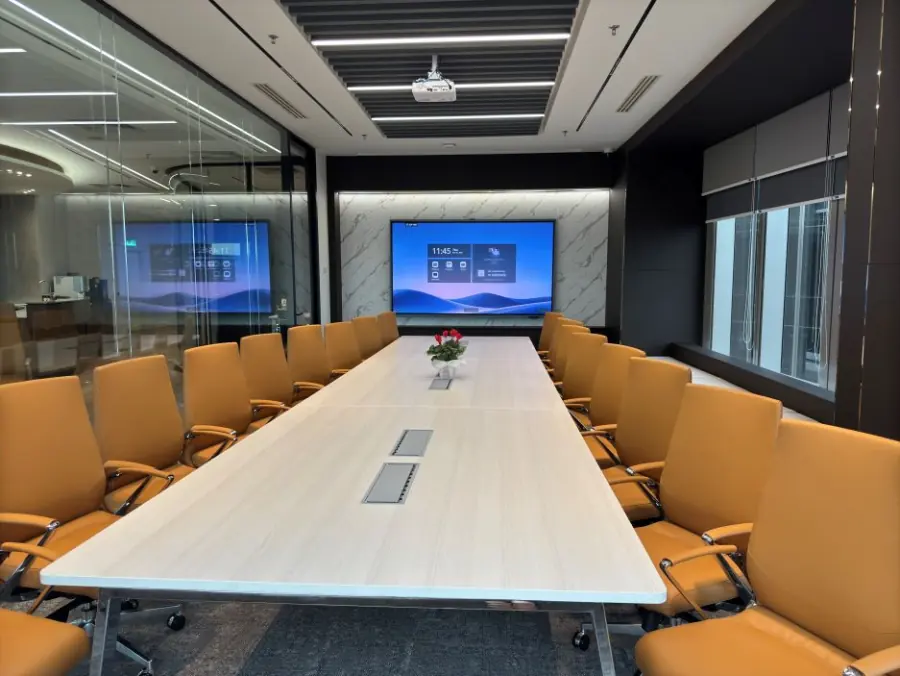
| Nexus Executive Boardroom | Up to 18 guests | 98-inch MAXHUB interactive display, 4K speaker-tracking camera and immersive 360° audio | RM300/hour; RM1,200 half day; RM1,800 full day |
| Synergy Suite | Up to 72 theatre, 36 classroom or 40 in clusters | 138-inch LED wall, supporting displays, smart lectern, professional PA system and live streaming capability | RM600/hour; RM2,300 half day; RM3,600 full day |
Both rooms include 1Gbps Wi-Fi, an on-site tech assistant, USB-C and wireless screen sharing, a smart whiteboard and filtered water. The live site lists Microsoft Teams, Zoom, Google Meet and Webex, through the room system or your own laptop. These details are confirmed on our room and equipment page.
For remote participants, Nexus provides speaker tracking and room audio for a table discussion. Synergy Suite provides a presentation setting with live streaming, broadcast and recording capability. Before your session, clarify whether remote guests will watch, present or join the discussion so the setup can follow your agenda.
For classroom or group activities, our Training Room Rental KL: Choosing the Right Setup guide provides further layout context. Choose the arrangement for the activities you're planning, using its published capacity rather than the room's maximum theatre capacity.
Budget for the room and your actual agenda
Maxsmart's hourly bookings have a two-hour minimum. A half day is four hours and a full day is eight hours; published prices include SST and equipment. A weekend fee applies on weekends and public holidays.
For a company's first room booking, FIRST50 gives 50% off the room rate. Book by 30/11/2026 and hold your meeting by 31/12/2026. The weekend or public holiday fee remains at its usual rate.
When preparing your budget, allow time within the booking for setup and testing. Keep catering requirements and any special production arrangements clear, particularly if you need a particular recording format or a managed broadcast. Confirm those details rather than relying on older package descriptions.
Prepare the remote experience before guests arrive
Give the person coordinating the session your agenda and intended platform in advance. Include the seating layout, remote presenters and any material requiring sound. Identify who will manage the meeting invitation and admit online guests.
Assign someone to watch the online experience during the meeting. They can bring chat questions into the discussion and alert the host if a remote guest cannot hear or see the shared material.
At the start, explain how questions will be handled and pause for remote contributions before moving to the next item. If you're recording, confirm permissions and the intended storage arrangement beforehand. A prepared room works best with a host who makes space for everyone to participate.
Frequently asked questions
What equipment should a hybrid meeting room in KL have?
Look for microphones and speakers suited to the seating layout, camera coverage and a way to share content with online participants. Test the complete setup using your intended meeting platform, including questions from different seats.
Does Maxsmart Event Space support Teams and Zoom meetings?
Yes. The live site lists Microsoft Teams, Zoom, Google Meet and Webex through the room system or your own laptop. Both rooms include an on-site tech assistant.
How much does a hybrid meeting room at Maxsmart cost?
Nexus Executive Boardroom costs RM300/hour, RM1,200 for a half day or RM1,800 for a full day; Synergy Suite costs RM600/hour, RM2,300 for a half day or RM3,600 for a full day. Prices include SST and equipment, with a two-hour minimum and a weekend fee on weekends and public holidays.
Which Maxsmart room suits a hybrid workshop?
Synergy Suite offers theatre seating for up to 72 guests, classroom seating for 36 or cluster seating for 40. For a smaller discussion around a table, Nexus Executive Boardroom accommodates up to 18 guests.
Can I record or live stream a meeting at Maxsmart?
The live site advertises live streaming, broadcast and recording capability, including these features for Synergy Suite. Confirm the intended platform, recording method and any specific production requirements before your session.
When your meeting format is settled, check availability and book your room at maxsmart.com.my. You can choose the room and duration that fit your agenda.
