
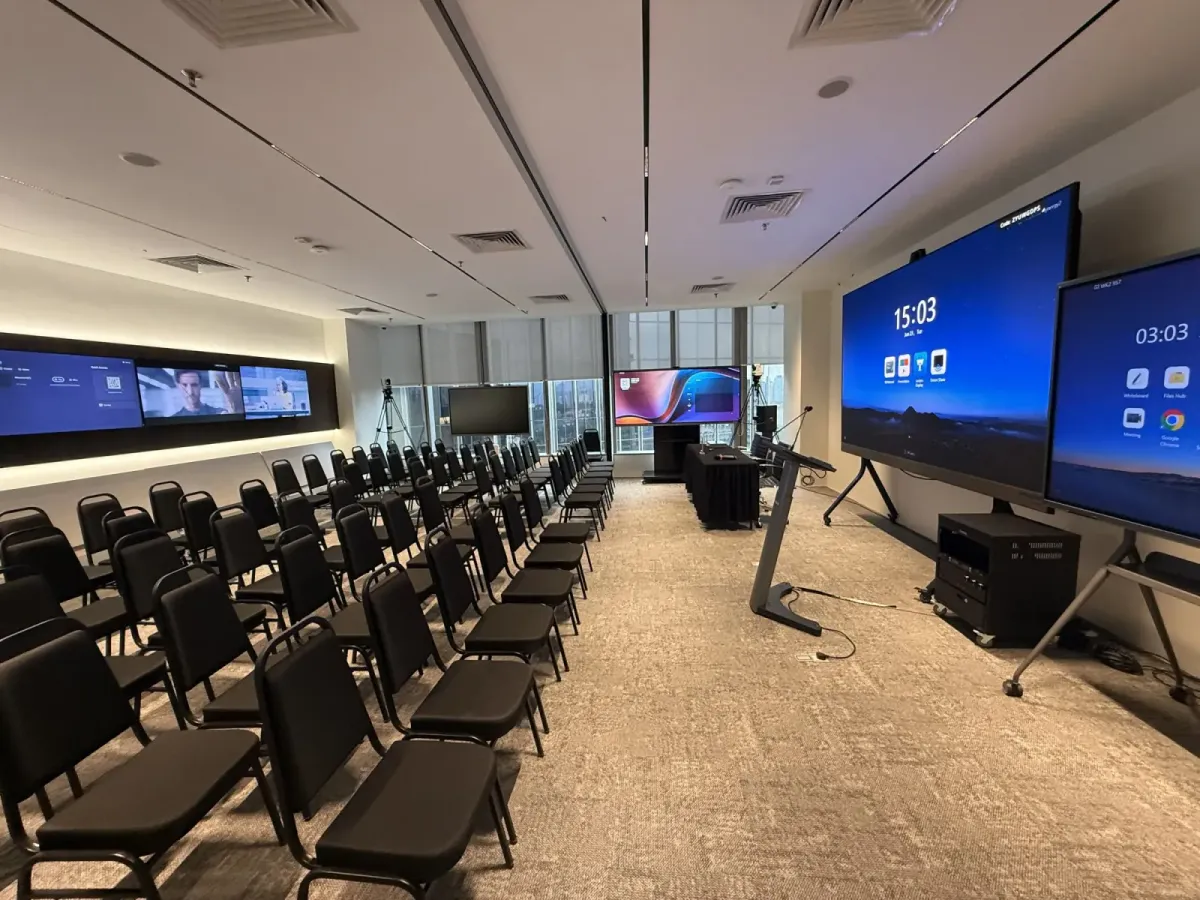
Product launch venue KL: screens, sound and stage space
A product launch venue in KL should give guests a clear view of the reveal, sound they can hear comfortably and enough space around the product. If you're inviting a remote audience, check the stream separately from the room presentation. We recommend assessing the actual launch layout before choosing a venue by its advertised capacity.
Choose the layout around your product
Start with what guests need to experience. A presentation led launch needs clear sightlines towards the screen, while a hands-on demonstration needs space for guests to approach the product. Put those movements into your room plan before deciding how many seats to request.
For a seated reveal, consider theatre seating with an aisle that gives presenters a clear route to the front. If guests need to take notes or examine samples at their seats, consider classroom seating. Our guide to theatre versus classroom seating helps you compare those arrangements.
Ask for a layout that includes your demonstration table and camera positions. Keep the entrance clear and show where packaging will go after the product is unpacked. A room's maximum seating figure should be a starting point for discussion, rather than your final launch capacity.
Test the LED wall with your actual content
An LED wall deserves a content check before the event. Ask the venue for its presentation format and prepare your reveal artwork to match. Open the final files on the installed display so you can check the logo, product images and smaller text from the back of the room.
Bring the laptop and connection adapters your presenter will use. Play the launch film through the room system, including its soundtrack, and check how the presentation returns after the video ends. Keep an offline copy of essential media available rather than relying entirely on a browser.
Check the view through a camera
If you plan to stream or photograph the reveal, review the screen through the camera as well. Look for visible flicker and check whether the presenter remains clearly exposed against the display. Ask the technical team to adjust the setup before approving the shot.
Stand where the presenter and product will be during the reveal. Check that neither blocks the main visual, and leave important text clear of those positions. A holding slide with the product name can provide a tidy background during introductions and audience questions.
Rehearse speech and video sound together
Treat the PA system as part of the launch rehearsal. Ask which microphones are available and choose them around how your presenters will move. Someone demonstrating a product may need their hands free, while audience questions need a practical way to reach the microphone.
Listen from the rear seats while the presenter speaks at a natural volume. Then play the launch video and check the change in level. Ask the operator to balance speech and playback so guests can follow the programme comfortably.
Agree who controls microphones and playback during each part of the event. Include the handover between the host and product specialist in your rehearsal. If you plan an audience discussion, decide whether questions will use a roving microphone or be repeated by the host.
Plan the stream as a separate guest experience
A remote guest needs a clear view of both the presenter and the product. Decide when the stream should show the room camera and when it should show presentation content directly. For a close demonstration, ask whether the camera can capture the detail you want viewers to see.
Run a rehearsal through the platform you intend to use. Have someone join from outside the venue and check the speaker's voice, video playback and shared slides. Test an audience question too, so you know what remote guests will hear during the discussion.
Confirm recording responsibilities
Agree who starts and stops the recording, where the file will be saved and who receives it afterwards. Ask whether camera operation or editing requires a separate arrangement. Our hybrid meeting setup guide provides related guidance on planning sound and video together.
Confirm the venue's connection arrangements for your production setup. If the launch depends on a live demonstration, discuss a backup with your technical team. Prepare a recorded version of essential demonstration content where that would help you continue the presentation.
Keep the stage area clear and plan access
A clean stage area can be a carefully arranged section at the front of the room. Confirm whether a raised platform is available if your programme requires one. Ask separately about the demonstration table, any backdrop installation and the lighting for photographs.
Mark where the product will sit and where the presenter will stand. Keep spare equipment outside the camera frame, and agree safe cable routes with the venue team. Leave room for the reveal cover or packaging to be removed without crossing the presenter's path.
Before committing to a venue, check how the product will reach the room. Confirm delivery access and lift suitability, particularly if your display is bulky. Include setup, rehearsal and packing time in your booking discussion so the guest programme fits comfortably within the agreed access period.
Your production brief should identify anything that needs a separate quotation, including custom staging or additional crew. Record those decisions alongside your running order. Our corporate event planning guide helps place these arrangements within the wider event plan.
How Maxsmart Event Space fits a product launch
Maxsmart Event Space is on Level 13, Corporate Tower 2, Pavilion Damansara Heights, Kuala Lumpur. Synergy Suite has a 138-inch LED wall with supporting displays, a smart lectern and a professional PA system. Live streaming is included, with a tech assistant on site. Venue details.
For an introductory media briefing or a small partner presentation, Nexus Executive Boardroom is another option. The table shows standard room rates, rather than a quotation for a custom launch production.
| Room | Published capacity | Hourly rate | Half day, 4 hours | Full day, 8 hours |
|---|---|---|---|---|
| Nexus Executive Boardroom | Up to 18 | RM300 | RM1,200 | RM1,800 |
| Synergy Suite | Up to 72 theatre or 36 classroom | RM600 | RM2,300 | RM3,600 |
Rates include SST, with a minimum booking of 2 hours. Every booking includes screens, 1Gbps Wi-Fi, USB-C and wireless sharing, and filtered water. Catering is available on request; confirm your launch layout and any additional production requirements before booking.
The advertised FIRST50 offer gives companies 50% off their first room booking. Book by 30/11/2026 for a date up to 31/12/2026; the weekend and public holiday fee remains payable at its usual rate. Custom events are quoted separately, so confirm how your launch will be booked before applying the room offer.
Frequently asked questions
What should I look for in a product launch venue in KL?
Check the screen using your actual presentation and test speech alongside video sound. Confirm the launch layout, product delivery access and any streaming requirements before booking.
Does a product launch need an LED wall?
Choose the display around your presentation content and the audience's view. Test the reveal visuals from the rear seats and through the camera if you're streaming or filming.
How much does Maxsmart Event Space cost for a product launch?
Synergy Suite's standard room rates are RM600 an hour, RM2,300 for a half day and RM3,600 for a full day, including SST. The minimum booking is 2 hours, while custom event requirements are quoted separately.
Can I live stream a product launch at Maxsmart Event Space?
Yes, Synergy Suite includes live streaming. Confirm your platform, camera requirements and recording arrangements during planning, then rehearse with someone joining remotely.
How many guests can Synergy Suite accommodate for a launch?
Published capacity is up to 72 in theatre seating or 36 in classroom seating. Ask for a launch layout that also accounts for your product display, camera positions and clear access routes before confirming attendance.
With your guest count and launch requirements ready, check availability and book at maxsmart.com.my.
