
How to Run a Hybrid Event: A Practical Planning Guide
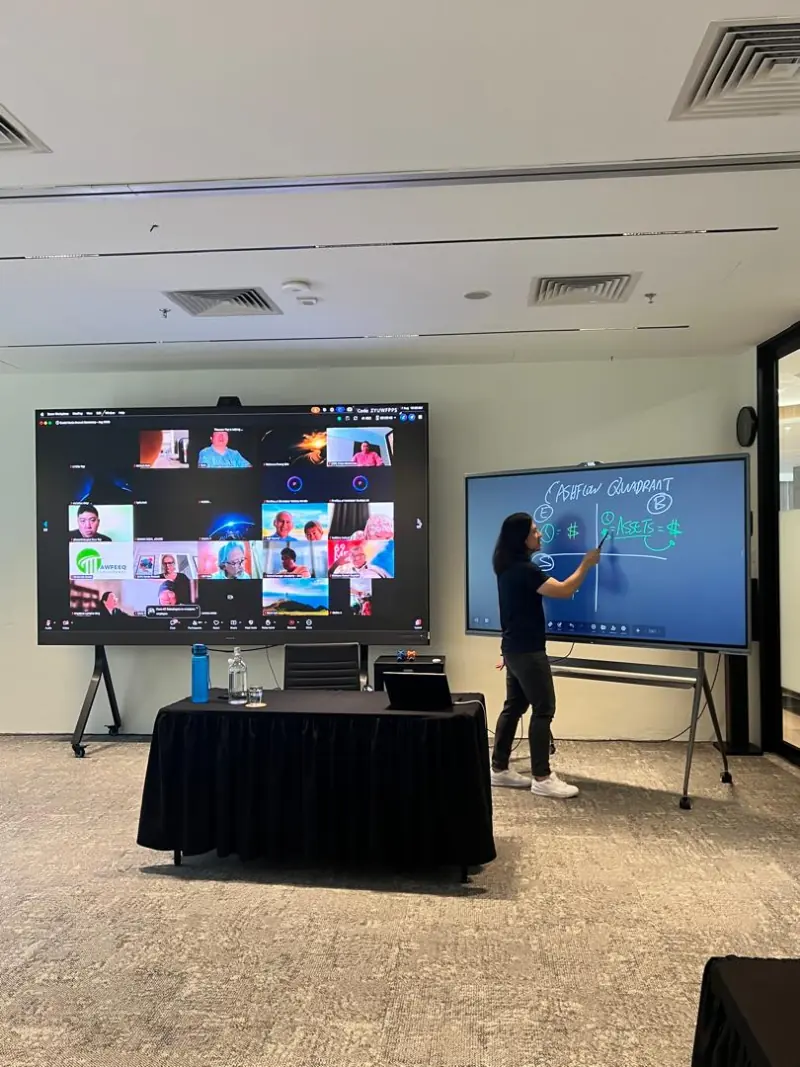
To run a hybrid event, plan how guests in the room and online will follow the programme and take part. Assign responsibility for each audience, rehearse the complete streaming setup and give everyone a clear way to ask questions.
Define what each audience will experience
Start with the outcome you want from the event. A briefing may need a presentation followed by moderated questions, while a workshop needs space for participants to contribute and work together. Decide which sessions remote guests can join before you prepare the invitation.
Map the experience from registration to the closing remarks. Your online guests need joining instructions and accessible materials, while those attending in person need arrival details and a suitable room layout. Both groups should understand what participation involves, as Webex’s hybrid event guidance recommends.
Make the invitation specific about what is available online. If an activity takes place only in the room, say so and consider a useful alternative for remote participants. Avoid promising online networking unless someone will host it.
For a smaller discussion, our guide to hosting a hybrid meeting that includes everyone provides a useful starting point. An event with speaker handovers needs additional attention to production cues and audience management.
Give every responsibility a named owner
Write names beside responsibilities in your running order. The presenter should know who will advance shared slides, and the chair should know who will flag online questions. CREDS’ hybrid event running order illustrates how explicit ownership supports delivery and handovers.
| Responsibility | In the room | Online |
|---|---|---|
| Event lead | Approves programme changes and coordinates the team | Decides what happens if the connection fails |
| Chair or moderator | Introduces speakers and manages discussion | Brings remote contributions into the conversation |
| Technical operator | Checks microphones and presentation feeds | Monitors the outgoing stream and remote speaker connections |
| Online host | Passes remote audience issues to the chair | Welcomes guests, watches chat and explains participation |
| Floor support | Helps arrivals and moves the audience microphone | Relays room questions so they can be heard online |
A small team may combine responsibilities, but check where tasks overlap. Someone troubleshooting a remote speaker may be unable to monitor questions at the same moment. Keep a private communication channel for the organising team, with agreed cues for pausing or continuing.
Choose and test the complete streaming setup
Choose the platform around participation. Establish whether remote guests will mainly watch and submit questions, or whether they need to speak and share work. Verify that your account supports the required features before you distribute the joining link.
Follow the signal from the room to the remote attendee. Check that the presenter’s microphone reaches the stream, that slides are shared clearly and that a remote speaker’s voice reaches the room. Include any presentation videos in this test, particularly their sound.
Give room questions the same attention as prepared speeches. Pass a microphone to the questioner, or have the moderator repeat the question into a live microphone before the speaker answers. Ask a colleague joining remotely to confirm that the whole exchange is understandable.
Our hybrid meeting room setup guide covers sound and video preparation in more detail. Agree the camera positions and internet connection with the venue team, then test the actual arrangement rather than relying on an equipment list.
Join through an attendee account during rehearsal. Check the view a guest receives, including slide readability and any waiting screen. If you plan captions, verify their availability and operation in the chosen platform.
Make Q&A welcoming for both audiences
Explain the question process during the opening remarks. Tell online guests where to submit questions, and tell the room whether to use that same channel or wait for a microphone. Give the online host a clear route to pass questions to the chair.
A shared question queue can help the moderator consider contributions from either audience. Provide a written link alongside any QR code so remote guests can open it directly. Read each selected question aloud before answering, including questions already visible in chat.
Allow for the time remote guests need to hear a prompt and respond. Avoid closing a discussion immediately after inviting online contributions. The moderator should acknowledge the remote audience throughout the programme, rather than remembering them only at the end.
Plan the breaks as carefully as the presentations. Show online guests when the programme will resume, using Malaysia time for a Kuala Lumpur event. If the room continues with an informal activity, explain whether remote guests have a hosted alternative or a break.
Rehearse the handovers and prepare a fallback
Rehearse with the people and equipment you intend to use. Webex advises testing presenters in the same space with the same technology as the event. Include a remote speaker joining, a presentation change and a question from the room in your rehearsal. Webex hybrid event guidance
Your running order should show what the audience sees, who acts and what cue triggers the next step. Mark when microphones become live and when the operator changes the shared content. Give the team the latest version so nobody follows an outdated programme.
Agree what happens if the stream stops. Name the person who will decide whether the room pauses, and prepare a message the online host can use if communication remains available. Keep local presentation copies and test any backup connection you intend to rely on.
If you plan to record, explain this to speakers and guests before the event. Confirm who starts the recording and checks that it is running. Afterwards, review feedback from each audience separately so a comfortable room experience does not hide problems online.
How Maxsmart Event Space fits your event
Maxsmart Event Space is at Level 13, Corporate Tower 2, Pavilion Damansara Heights, Kuala Lumpur. Nexus Executive Boardroom accommodates up to 18 guests; Synergy Suite accommodates up to 72 in theatre seating or 36 in classroom seating. Venue details
Nexus costs RM300 an hour, RM1,200 for a half day or RM1,800 for a full day. Synergy Suite costs RM600 an hour, RM2,300 for a half day or RM3,600 for a full day. Prices include SST, with a two-hour minimum and a weekend or public holiday fee where applicable. Current rates
Every booking includes MAXHUB screens, 1Gbps Wi-Fi and a tech assistant on site. Synergy Suite adds a PA system, smart lectern and live streaming. Confirm your production responsibilities with us before booking, particularly who will operate the platform and moderate online guests. Room inclusions
The FIRST50 offer gives companies 50% off their first room booking when booked by 30/11/2026 for a meeting by 31/12/2026. It discounts the room rate; the weekend or public holiday fee remains at the usual rate. Offer details
Frequently asked questions
What do you need to run a hybrid event?
You need a suitable room, microphones, a camera, clear presentation sharing and a tested internet connection. Assign people to manage the technical setup and online audience, then rehearse the complete programme.
What is the difference between a hybrid event and a livestream?
A livestream can simply broadcast a presentation to viewers. For a participatory hybrid event, plan how remote guests can contribute through moderated questions or discussion, alongside those attending in person.
How do you manage Q&A at a hybrid event?
Explain the question process at the start and assign someone to monitor online submissions. The moderator should read selected questions aloud and ensure room questions reach the stream through a microphone.
How can you avoid echo during a hybrid event?
Agree with the technical operator which devices will handle room audio, and keep other devices from joining with active microphones and speakers. Test the arrangement with a remote attendee before guests arrive.
Do you need a dedicated online host for a hybrid event?
Assign explicit ownership of the online audience, even if that person also has another role. A dedicated host is a sensible choice when monitoring chat and helping remote speakers would compete with the chair’s duties.
Once your programme and guest numbers are ready, check availability and book at Maxsmart Event Space.