
Seminar Room Rental Kuala Lumpur: Seating and Tech Guide
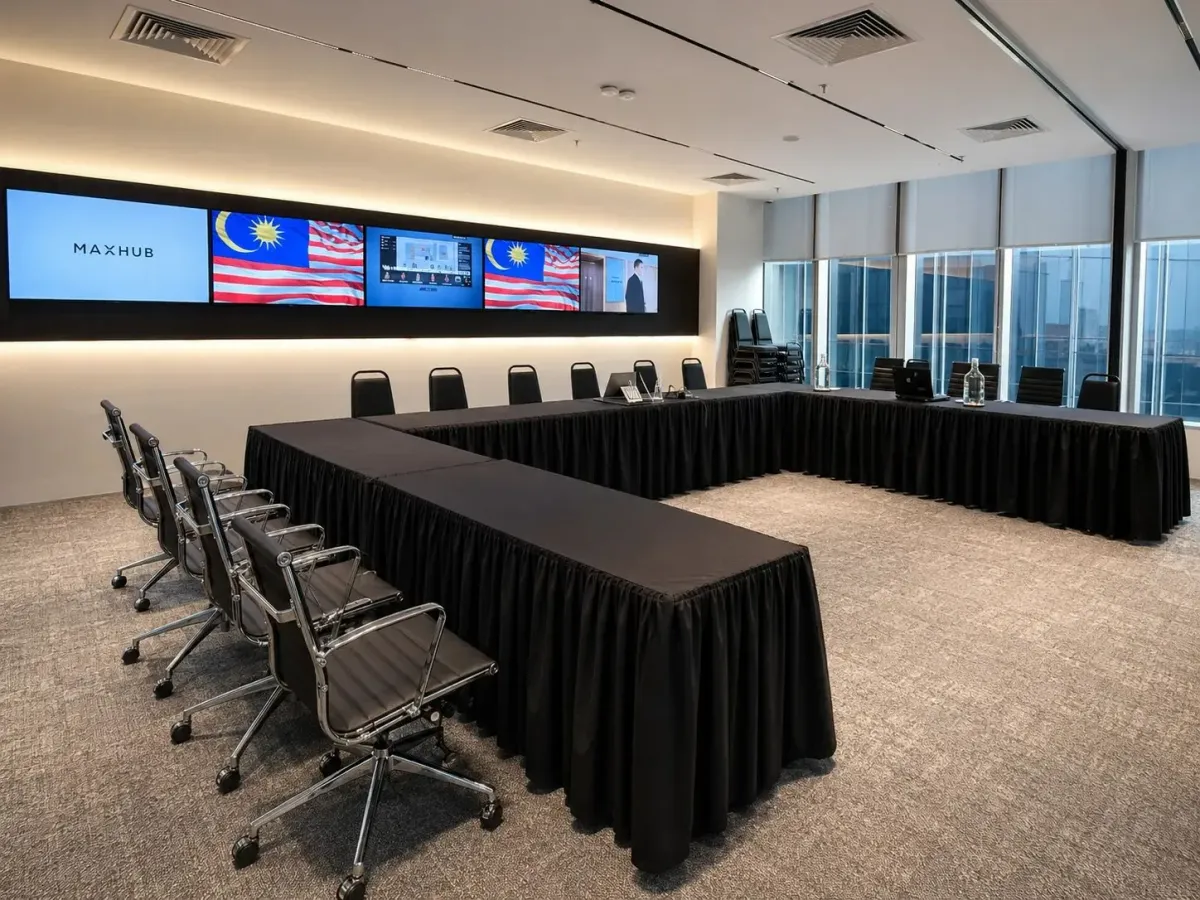
For seminar room rental in Kuala Lumpur, choose your seating layout before comparing room prices, then confirm which technology and support the rate includes. At Maxsmart Event Space, Synergy Suite accommodates up to 72 guests in theatre seating, 36 in classroom seating or 40 in clusters. Your preferred arrangement should follow how guests will participate, with space for the presenter and the activities you have planned.
Define what your seminar needs to achieve
Start with the agenda and the work you expect guests to do. A presentation followed by questions needs a different arrangement from a workshop where participants use laptops or discuss tasks around tables. This decision helps you judge whether a room's advertised capacity suits your session.
Write a short booking brief that describes the audience, the programme and any access requirements. Include whether the presenter will move around the room and whether guests joining remotely need to contribute. Share these details before agreeing to a layout so the venue can assess the complete setup.
Plan the room access you need around the programme itself. Your presenter may need time to connect a laptop, test slides and prepare materials before registration begins. Confirm whether preparation and packing away must take place within your paid booking period.
Match the seating to the way guests will participate
A room's maximum capacity applies to a particular arrangement. Tables take up space, so a theatre capacity should never be treated as the number of guests who can attend with desks. Ask for the capacity of your chosen layout and describe any additional furniture you need.
The following comparison uses Synergy Suite's published seating options. U-shape is available on request, but the live site does not publish its capacity, so confirm the guest count before choosing it.
| Seating arrangement | Synergy Suite capacity | When to consider it | What to confirm |
|---|---|---|---|
| Theatre | Up to 72 guests | Presentations where the audience mainly listens | Screen visibility and space for questions |
| Classroom | Up to 36 guests | Sessions with laptop work or written exercises | Table space and access to power |
| Cluster | Up to 40 guests | Workshops with discussion around tables | Group arrangement and presenter movement |
| U-shape | On request; capacity not published | Facilitated discussion with an open central area | Guest count and the proposed floor plan |
If you expect participants to complete exercises throughout the seminar, classroom seating gives you a useful starting point. For discussion, consider how guests will face one another and return their attention to the presenter. Our training room setup guide explores these choices in more detail.
Check the technology against your actual programme
Ask for an itemised equipment list, then connect each item to something in your agenda. A screen matters only if your slides are readable from the intended seating positions. A sound system should be assessed against the presenter's delivery and how audience questions will be handled.
Bring a representative slide containing the smallest text you intend to show. Test it from the back of the room, along with any video or audio in the presentation. Confirm the connection method for the presenter's laptop and identify any adapter you need to bring.
For a hybrid seminar, test what remote guests will see and hear. Decide how their questions will reach the presenter and who will monitor the meeting platform during the session. Our hybrid meeting room guide helps you work through those requirements.
An on-site tech assistant is useful, but your programme still needs clear responsibilities. Confirm who starts the call, advances slides and manages any recording. If you plan to keep a recording, agree on the required output and how it will be handed over.
Compare the complete cost of the booking
Compare quotations using the same duration and seating arrangement. Check whether the price covers equipment and technical support, then identify anything charged separately. Catering and guest parking should also be considered in your planning budget.
Keep the room rate separate from optional services when reviewing costs. This makes it easier to see whether a lower advertised price still meets your seminar requirements. Ask for clarification wherever a quotation says a service is merely available rather than included.
Weekend and public holiday charges can change the total, even when a room offer applies. At Maxsmart Event Space, those bookings carry a separate fee, and FIRST50 discounts the room rate only. Review the final amount for your selected date before paying.
Read cancellation terms before making a commitment, especially if attendance depends on external registrations. Maxsmart's pricing reference states that Synergy Suite requires at least 14 working days' notice for a full refund on a standard booking. Promotional bookings receive credit instead of a refund.
How Maxsmart Event Space fits a seminar booking
We welcome seminar organisers to Level 13, Corporate Tower 2, Pavilion Damansara Heights, Kuala Lumpur. Synergy Suite offers the flexible seating described above, while Nexus Executive Boardroom accommodates up to 18 around a boardroom table. Nexus is worth considering when your session centres on a smaller group discussion.
Synergy Suite's standard rate is RM600 an hour with a two-hour minimum, RM2,300 for a half day of four hours or RM3,600 for a full day of eight hours. Nexus costs RM300 an hour, RM1,200 for a half day or RM1,800 for a full day. The listed prices include SST and equipment.
Synergy Suite has a 138-inch LED wall with supporting displays, a smart lectern and a professional PA system. Included room facilities cover 1Gbps Wi-Fi, an on-site tech assistant, USB-C and wireless screen sharing, a smart whiteboard and filtered water. The live site also lists live streaming, broadcast and recording for Synergy Suite; catering is available on request. See the current room details.
For a company's first room booking, FIRST50 offers 50% off the room rate when booked by 30/11/2026 for a meeting held by 31/12/2026. The weekend or public holiday fee remains payable at its usual rate. Check the selected booking details against the offer before completing payment.
Confirm arrival details and secure your room
Give guests the tower name and floor in their invitation, alongside the venue name. Maxsmart Event Space is reached by a covered walk from Pusat Bandar Damansara MRT, and guests using the Pavilion Damansara Heights car park pay parking separately. Allow arrival time for guests to find Corporate Tower 2 and take the lift.
Online room bookings are available every day between 8:30am and 5:30pm, with two-hour, three-hour, half-day and full-day options. The live site asks you to book at least two days ahead. Payment by FPX or card confirms the room once it goes through.
Before payment, review the date and duration against your programme and make sure the selected room accommodates your preferred seating. Keep a copy of the booking confirmation with the details your presenter needs. Share arrival instructions with guests after the booking is secured.
Frequently asked questions
How much does seminar room rental in Kuala Lumpur cost at Maxsmart?
Synergy Suite costs RM600 an hour with a two-hour minimum, RM2,300 for four hours or RM3,600 for eight hours. Prices include SST and equipment, with a separate fee for weekends and public holidays.
How many people can Synergy Suite accommodate?
Synergy Suite accommodates up to 72 in theatre seating, 36 in classroom seating or 40 in clusters. U-shape is available on request, but its capacity is not published and needs confirmation.
Which seating layout should I choose for a seminar?
Consider theatre seating when guests mainly listen to presentations, or classroom seating when they need tables for laptops and exercises. Cluster seating is worth considering for group discussion; confirm the arrangement against your programme before booking.
What technology is included with Synergy Suite rental?
Synergy Suite includes an LED wall with supporting displays, a smart lectern and a professional PA system, alongside Wi-Fi and an on-site tech assistant. Screen sharing, a smart whiteboard and live streaming are also listed on the live site.
Is there a first-booking discount for seminar room hire?
FIRST50 gives a company 50% off its first room booking when booked by 30/11/2026 for a meeting held by 31/12/2026. It discounts the room rate only, so any weekend or public holiday fee remains payable at the usual rate.
When your programme and seating requirements are ready, check availability and book at Maxsmart Event Space. You can review the room options and your selected booking details there before payment.
